In today’s digital landscape, Mobile-friendly email templates play a crucial role in reaching audiences effectively. With most users accessing their emails via mobile devices, businesses must prioritize designs that cater to these platforms, ensuring a seamless experience. This not only enhances user engagement but also boosts conversion rates, making it essential for marketers to understand and implement best practices.
From optimizing images to testing layouts on various devices, creating responsive email designs can elevate your marketing efforts. This guide delves into the best practices for mobile-friendly email templates, highlights their integration with broader digital strategies, and addresses the common challenges faced by businesses in this ever-evolving realm.
Importance of Mobile-Friendly Email Templates

In today’s digital landscape, mobile devices are at the forefront of communication, making mobile-friendly email templates essential for businesses. Emails that are optimized for mobile viewing ensure that your audience can easily access and interact with your messages, regardless of where they are. As more consumers rely on their smartphones for checking emails, having a mobile-friendly approach becomes a crucial factor in effective marketing strategies.Utilizing mobile-friendly email templates offers numerous benefits for businesses, including enhanced user experience, increased engagement, and improved conversion rates.
When emails are optimized for mobile, they load faster and are easier to read, which reduces frustration and keeps recipients engaged. Studies show that mobile-friendly emails can lead to significantly higher click-through rates, translating into increased sales and customer loyalty. Furthermore, optimizing email design for mobile devices ensures that your content is presented clearly, allowing recipients to take the desired action with minimal effort.
Benefits of Mobile Optimization
Creating mobile-friendly emails can greatly impact user engagement and conversion rates. Here are some key advantages:
- Improved Readability: Mobile-friendly designs adapt to different screen sizes, making text and images legible and appropriately sized.
- Higher Engagement: Recipients are more likely to interact with visually appealing and accessible emails, leading to increased click-through rates.
- Increased Conversions: A seamless user experience encourages more purchases or sign-ups, ultimately boosting sales.
- Better Metrics Tracking: Mobile-optimized emails can provide clearer insights into user behavior, helping businesses refine their strategies.
However, businesses often encounter challenges when designing mobile-friendly emails. Some of the common obstacles include:
- Layout Limitations: Ensuring that the email layout is visually appealing and functional on various devices can be complex.
- Image Rendering Issues: Images must be optimized for quick loading without sacrificing quality, which can be tricky.
- Testing Difficulties: Testing emails across multiple devices and email clients can be time-consuming and resource-intensive.
- Designing for Touch: Buttons and links should be appropriately sized for mobile users to avoid frustration while navigating.
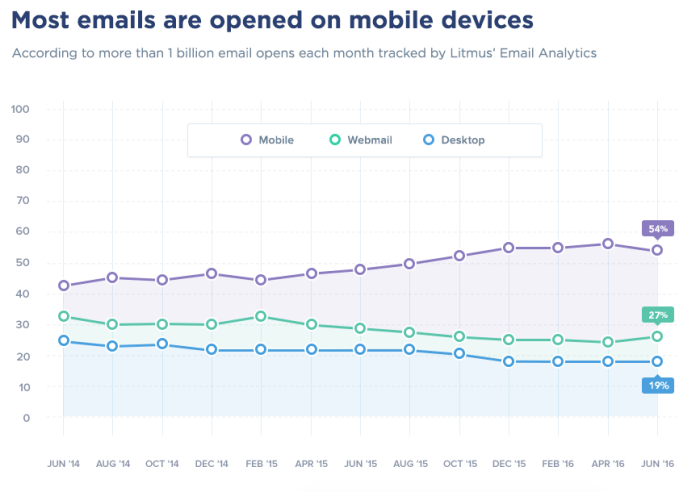
“Mobile devices account for over 50% of all email opens, making a mobile-friendly design not just an option, but a necessity for modern communication.”
Best Practices for Designing Mobile-Friendly Email Templates
Creating mobile-friendly email templates is vital for enhancing user experience and improving engagement rates. With the increasing use of mobile devices to access emails, it is essential to focus on design practices that cater to these platforms. A well-structured email can make the difference between a reader engaging with your content or simply deleting it.
Responsive Design Techniques
Responsive design is crucial for ensuring your emails look great on any device. Here are detailed steps to create responsive email designs:
Use Fluid Grids
Instead of fixed-width layouts, fluid grids allow your email to adjust based on the screen size. This means that instead of setting a fixed width, use percentages to define widths for different elements so they resize fluidly.
Media Queries
Incorporate CSS media queries to apply different styles based on the device’s characteristics, such as screen width. For example: “`css @media only screen and (max-width: 600px) .container width: 100% !important; .column width: 100% !important; “`
Single Column Layouts
For mobile devices, a single-column layout is often more effective as it allows for easier reading and navigation. Multiple columns can be challenging on smaller screens, causing users to zoom or scroll unnecessarily.
Image Optimization for Mobile Users
Images can significantly affect loading times and user experience on mobile devices. Here are tips for optimizing images:
Use Appropriate File Formats
Choose the right file format for your images. JPEG is ideal for photographs, while PNG is better for graphics that require transparency. Additionally, consider using WebP format for improved compression without losing quality.
Compress Images
Utilize tools to compress images before embedding them in your emails. This reduces file sizes and ensures faster loading times, providing a better experience for users on slower connections.
Set Maximum Width
Always define a maximum width for images to ensure they scale correctly on smaller devices. For example, setting the image width to 100% ensures it fits within the device’s screen size without distortion.
Testing and Previewing Emails Across Platforms
Testing your emails before sending them is critical to ensure they render correctly across various devices and email clients.
Use Testing Tools
Employ email testing services like Litmus or Email on Acid to preview how your email will look on different devices and email clients. These tools allow you to see potential issues before launching your campaign.
Send Test Emails
Always send test emails to yourself and check them on different devices, including smartphones, tablets, and desktops. This method provides firsthand insight into how your audience will experience your email.
Check Load Times
Monitor how quickly your email loads on various devices. If it takes too long, users may not wait for it to open, leading to lower engagement rates.By following these best practices, you can create mobile-friendly email templates that not only look good but also enhance the overall user experience. Prioritizing design and functionality will ultimately lead to better engagement and higher conversion rates.
Integration of Mobile-Friendly Emails with Other Digital Strategies
Mobile-friendly email templates serve as a pivotal element in a brand’s digital marketing strategy. By optimizing email communications for mobile devices, businesses can create a seamless user experience that complements other digital strategies, ultimately enhancing engagement and conversion rates. This integration can amplify the effectiveness of advertising campaigns, unify marketing efforts, and provide measurable results across platforms.
Enhancement of Banner Advertising Efforts
Mobile-friendly email templates can significantly boost the performance of banner advertising campaigns. When emails are designed to be visually appealing and easy to navigate on mobile devices, they encourage users to click through to banner ads with greater frequency. This seamless transition between email content and banner ads can enhance user experience and increase brand visibility. For instance, including well-placed banner ads within mobile emails can lead to higher click-through rates (CTR) compared to traditional methods.
A report by Litmus found that mobile opens account for approximately 46% of all email opens, showcasing the potential audience for mobile-optimized emails. To optimize the synergy between emails and banner ads, consider the following elements:
- Responsive design: Ensure banner ads are also mobile-optimized to fit various screen sizes.
- Clear calls-to-action: Utilize actionable language that encourages immediate engagement with the banner content.
- Visual consistency: Maintain brand consistency across emails and banners to reinforce recognition.
Synergy Between Email Marketing and Social Media Campaigns
The connection between email marketing and social media campaigns can significantly enhance overall marketing effectiveness. Mobile-friendly emails can drive traffic to social media platforms, fostering a cohesive brand experience across digital touchpoints. When users receive engaging email content that prompts them to share or engage on social media, it amplifies brand reach.For a successful integration, brands should:
- Incorporate social sharing buttons directly within mobile-friendly email templates, making it easy for recipients to share content with their networks.
- Encourage recipients to follow social media accounts, creating a direct pathway for user interaction beyond the email.
- Utilize user-generated content from social media within email campaigns to showcase community engagement and authenticity.
Effectiveness of Mobile-Friendly Emails Compared to Traditional Methods
The shift towards mobile-friendly emails marks a significant evolution in internet marketing strategies. Compared to traditional email marketing methods, mobile-optimized emails demonstrate higher engagement levels, resulting in improved conversion rates. According to a survey by HubSpot, mobile-friendly emails can lead to a 15% increase in click rates compared to their non-optimized counterparts.When assessing the effectiveness of mobile-friendly emails versus traditional methods, consider the following points:
- Accessibility: Mobile-friendly emails are easily readable on smartphones and tablets, catering to the growing number of users accessing emails on the go.
- User experience: A well-structured mobile email enhances user experience, leading to greater satisfaction and loyalty.
- Analytics and tracking: Mobile-friendly emails provide valuable insights into user behavior, enabling marketers to refine strategies based on real-time data.
Final Review
To wrap it up, embracing Mobile-friendly email templates is not just a trend but a necessity for businesses aiming to thrive in the digital age. By following best practices and integrating these templates with other marketing strategies, brands can significantly enhance their outreach. As we continue to adapt to changing user behaviors, prioritizing mobile optimization will remain key to driving engagement and achieving business success.
FAQ Corner
What are mobile-friendly email templates?
Mobile-friendly email templates are designs specifically optimized for viewing on mobile devices, ensuring that content is easily accessible and visually appealing on smaller screens.
Why are mobile-friendly email templates important?
They are important because they improve user experience, increase engagement rates, and can lead to higher conversion rates.
How can I test my mobile-friendly email templates?
You can test your templates using various tools that simulate email viewing on different mobile devices and screen sizes, or by sending test emails to your own devices.
What common challenges do businesses face with mobile-friendly emails?
Common challenges include ensuring images load correctly, maintaining a coherent layout across devices, and keeping load times fast.
Can mobile-friendly emails enhance social media campaigns?
Yes, when integrated well, mobile-friendly emails can drive traffic to social media platforms and encourage user interaction through shared content.